Johnson & Johnson MedTech · DePuy Synthes

Designing a Facial
Reconstruction
Surgical Planning
Platform

A UX-led initiative to streamline complex clinician workflows, reduce error-prone intake processes, and deliver a scalable design system for regulated healthcare software.
TRUMATCH Platform Case Study
Team
1 PM · 4 Designers · 10 Engineers Me as Senior UX Designer
Timeline
6 Months Intake & Mobile Designs
Tools
Figma · Appian Design Systems · Dev Handoff
Responsibilities
End-to-End Design Process Intake · Mobile · Design System
Introduction

Project Overview

TRUMATCH Facial Reconstruction Platform  ·  DePuy Synthes
The Problem
Surgeons faced fragmented and inefficient workflows when creating facial reconstruction cases: every step was a potential point of failure.
End-to-End Planning
Virtual planning system covering the full facial reconstruction workflow
Personalized Implants
Supports surgical planning and delivery of surgeon-recommended implants
Digital to Physical
Connects digital workflows with real physical surgical outcomes
My Responsibilities: Lead end-to-end design process
Owned UX for case intake experience
Designed intake form for surgeon & delegate workflows
Designed mobile experiences
Collaborated with product, engineering, clinical & regulatory teams
Results

Measurable Impact Delivered

Outcomes validated through clinician satisfaction surveys, design system adoption metrics, and delivery velocity tracked across sprint cycles.

15%
Increase in clinician satisfaction scores post-redesign
25%
Faster feature delivery enabled by the scalable design system
1
Scalable design system built from the ground up, adopted across teams
UX Strategy

Design a low-friction, streamlined,
error-proof case creation flow

A UX-led approach to simplify case creation, prevent errors early, and support high-stakes clinical decisions without adding cognitive or administrative burden.

Reduce Friction
Streamline case creation so surgeons move through steps without unnecessary complexity
Prevent Errors
Prevent incomplete or incorrect submissions through inline validation and guidance
Safe Delegation
Enable delegation to clinical staff without loss of control or data quality
Visual Clarity
Simplify complex clinical inputs through structured visual guidance
Cross-Platform
Ensure consistency and confidence across desktop and mobile experiences
Design Process

From Discovery to Delivery

A structured process that moved from understanding surgeon workflows to delivering tested, developer-ready interfaces.

Discover
Stakeholder interviews, workflow mapping, clinical research
Ideation
Sketches, user flows, delegate persona, architecture
Wireframes
Low-fi wireframes, step navigation, error states
Hi-Fi Design
Style guide, high-fidelity UI, responsive mobile
Handoff
Dev notes in Figma, component library, interaction specs
Key Feature

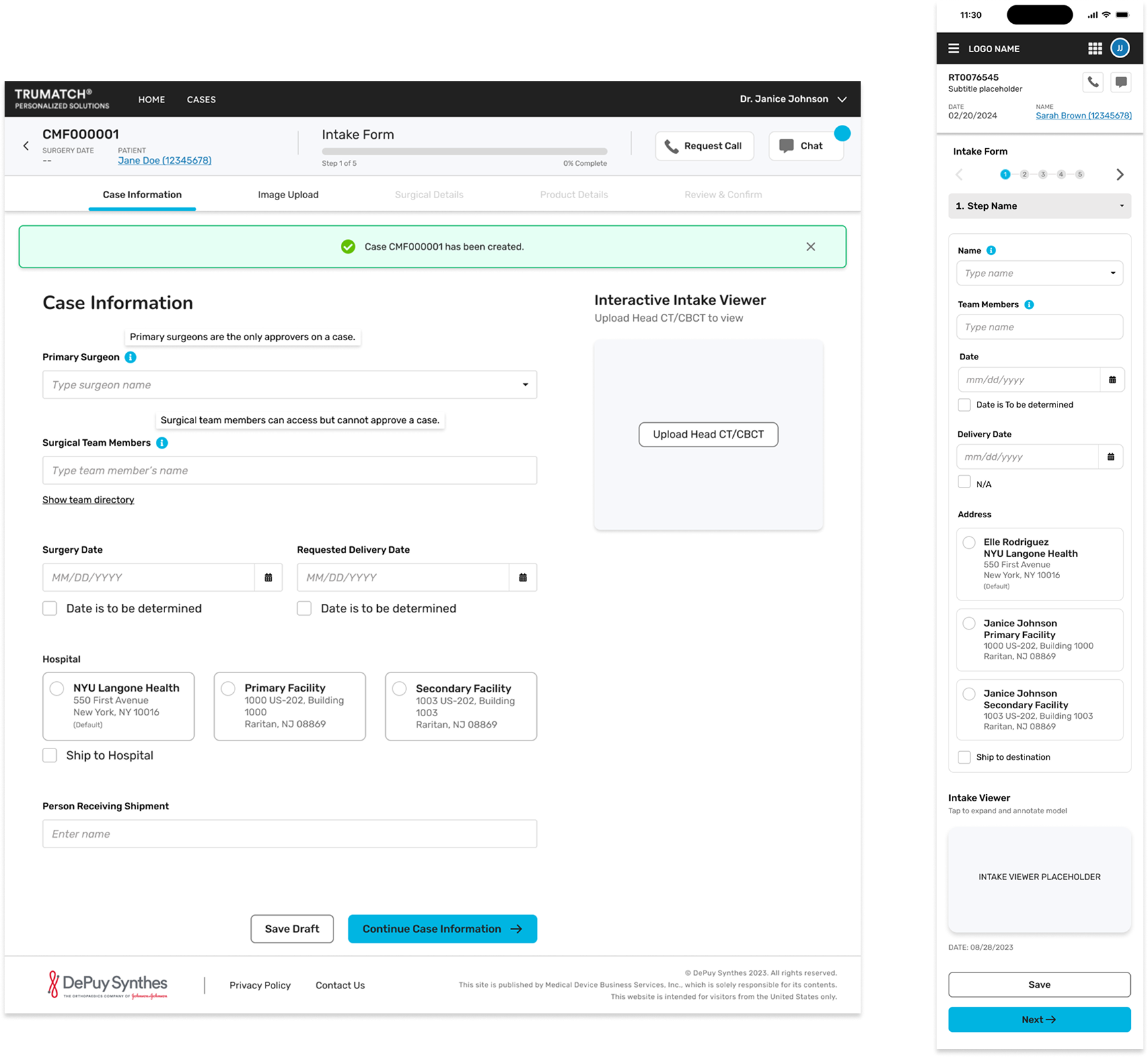
Intake Form: Why it mattered?

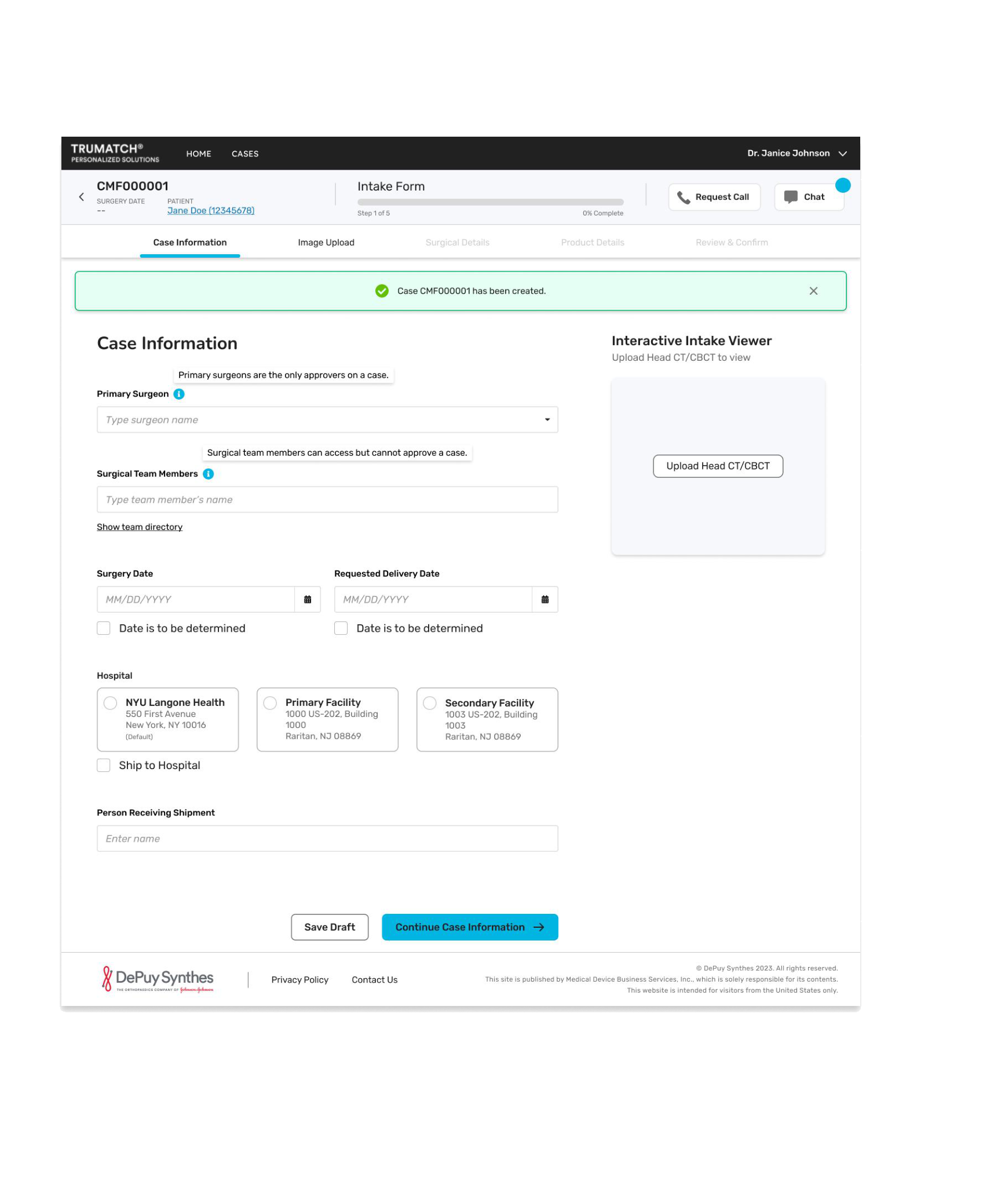
The intake form is the single source of truth for the entire surgical planning process.

  • Designed a simple 5-step intake flow to reduce cognitive load
  • Ensured structured, complete inputs so biomedical and surgical planning engineers can accurately design surgeon-recommended implants
  • Introduced a delegate persona to allow surgeons to offload intake tasks to nurses or clinical assistants when time-constrained
1Patient Information & Case Details
2Imaging & Diagnostic Upload
3Surgical Region & Implant Preferences
4Clinical Notes & Special Requirements
5Review, Validate & Submit Case
TRUMATCH Intake Form UI
Design Thinking

Ideation

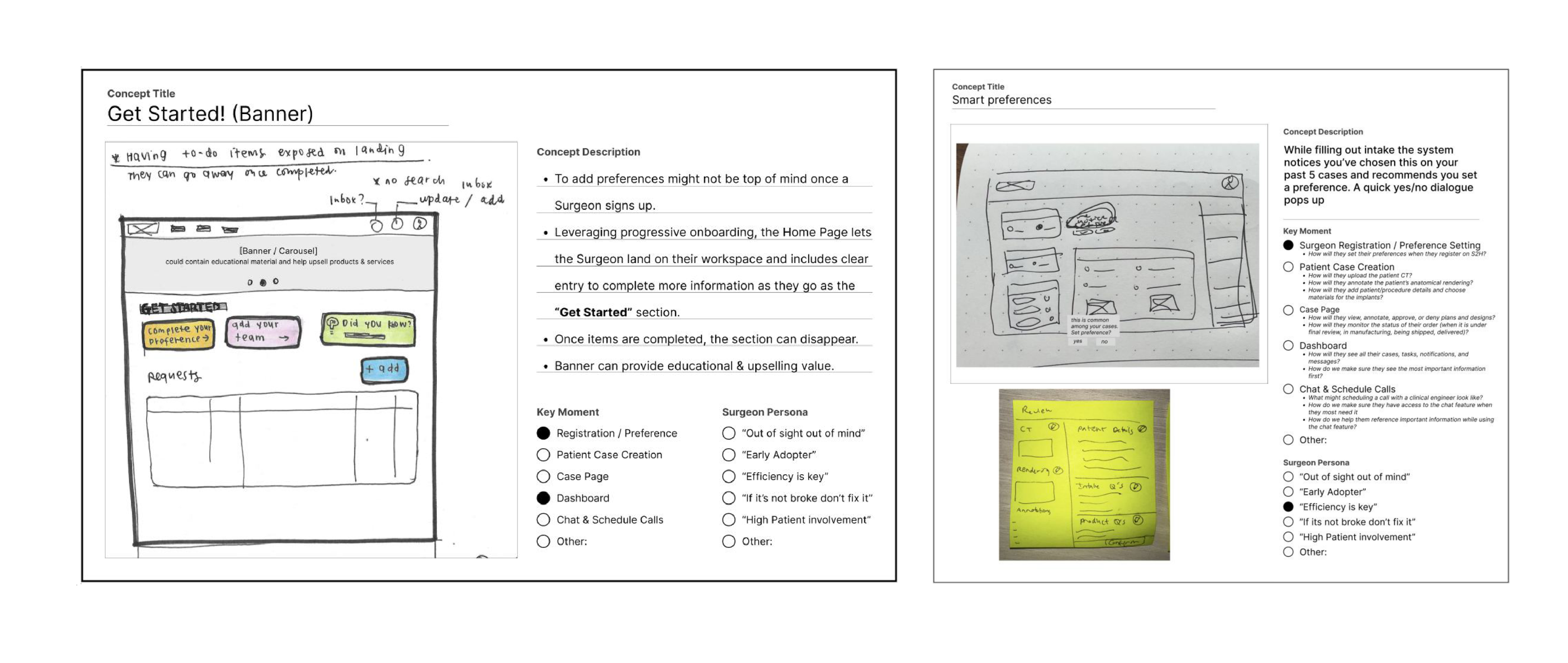
Early ideation focused on progressive onboarding for new surgeons and smart preference management to reduce cognitive load across key mentors: Registration, Case Page, Chat & Schedule.

Ideation Sketches
Low-Fidelity

Wireframe

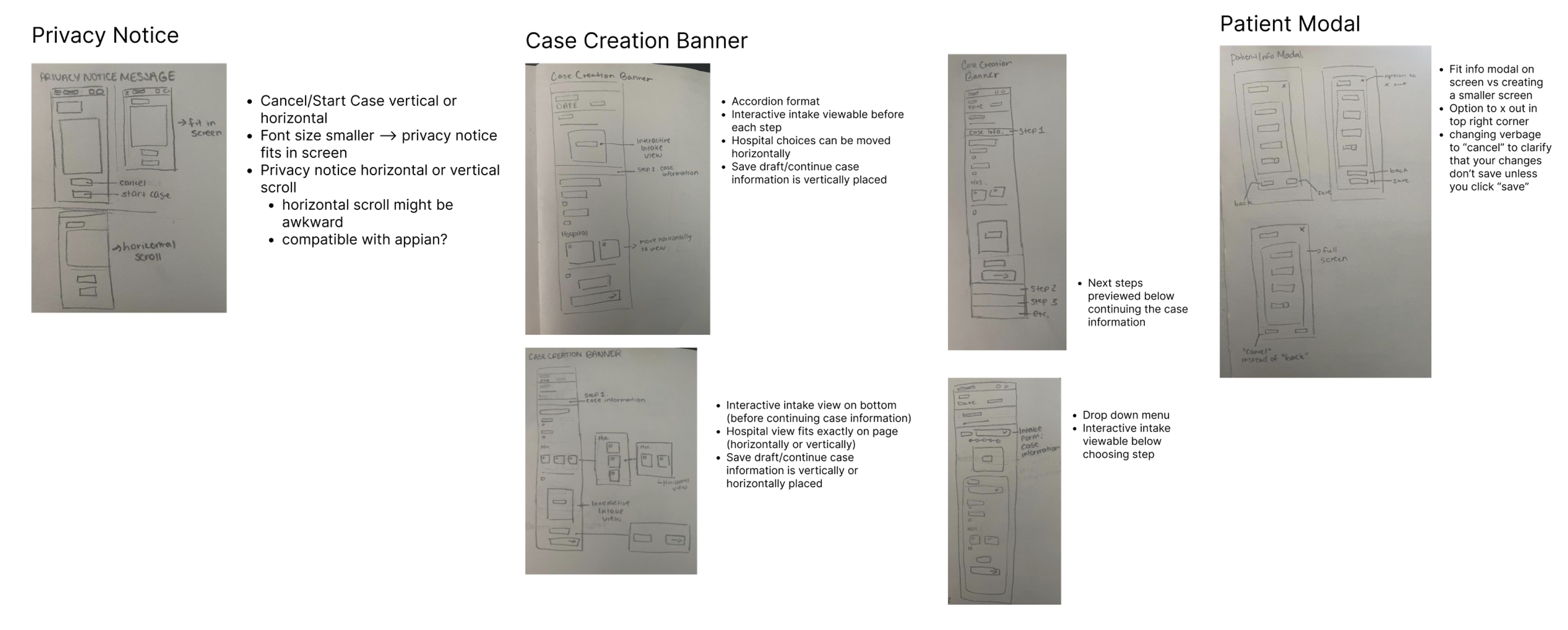
Three core wireframe explorations defined the structural decisions for the intake flow.

  • Privacy Notice: Cancel/Start Case vertical or horizontal; font size fits in screen; horizontal or vertical scroll might be awkward; compatible with Appian?
  • Case Creation Banner: Accordion format; Interactive Intake viewable before each step; Interactive Intake view on bottom; Modal case fits exactly on page (horizontally or vertically); Banner information is vertically or horizontally placed
  • Patient Modal: Fill this modal on screen to create a smaller screen; Drop-down menu; Next steps presented below, continuing the case information; top right corner alert for unsaved changes that you click "save"
Wireframes: Privacy Notice, Case Creation Banner, Patient Modal
Visual Identity

Visual Style Guide

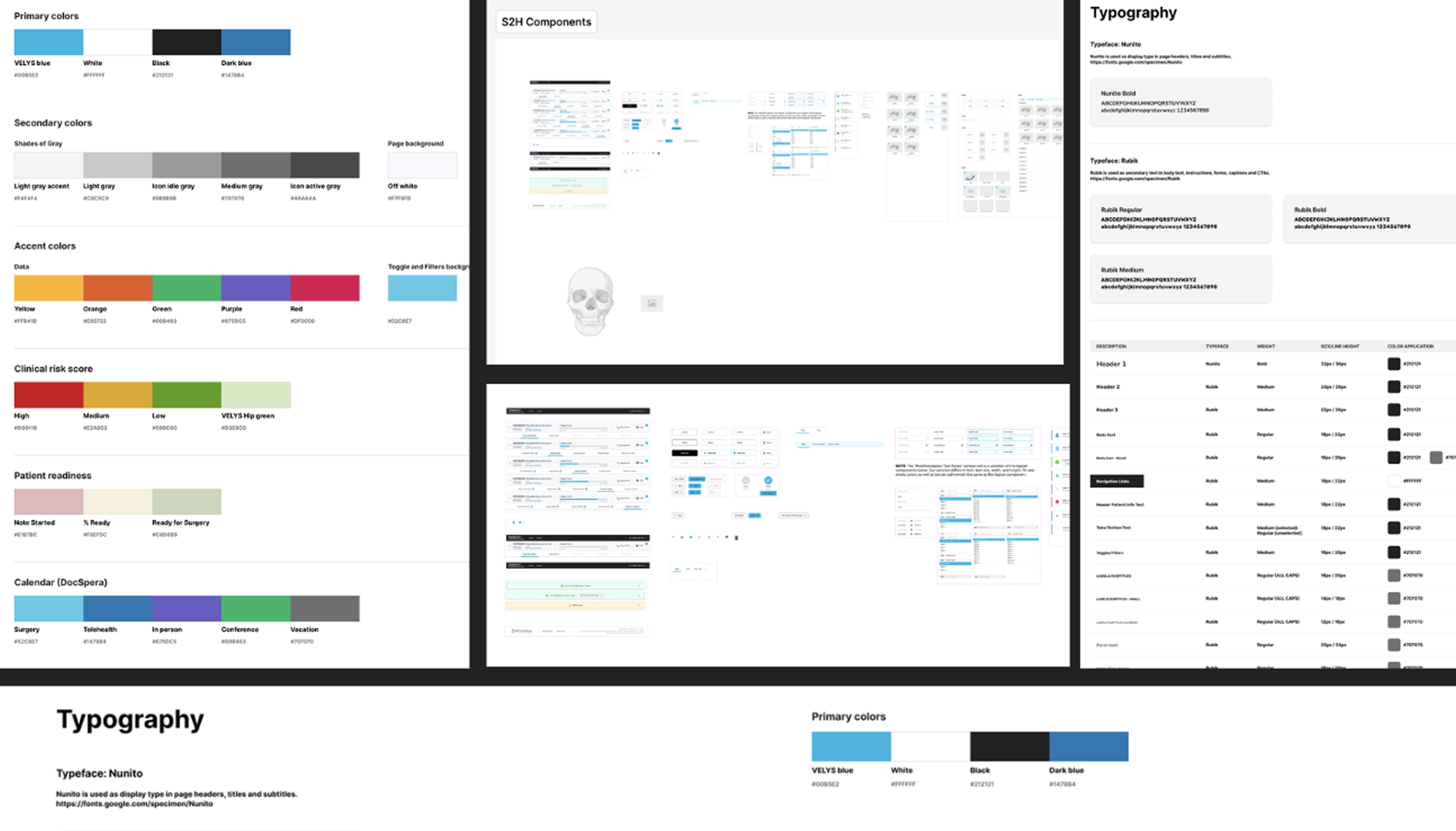
A dynamic, scalable design system built in Figma using the Nunito typeface, clinical color tokens, and reusable SDH components: supporting multiple product branches with one-click style propagation.

Visual Style Guide: Colors, Typography, Components
Hi-Fidelity Designs

TRUMATCH Platform: Final Screens

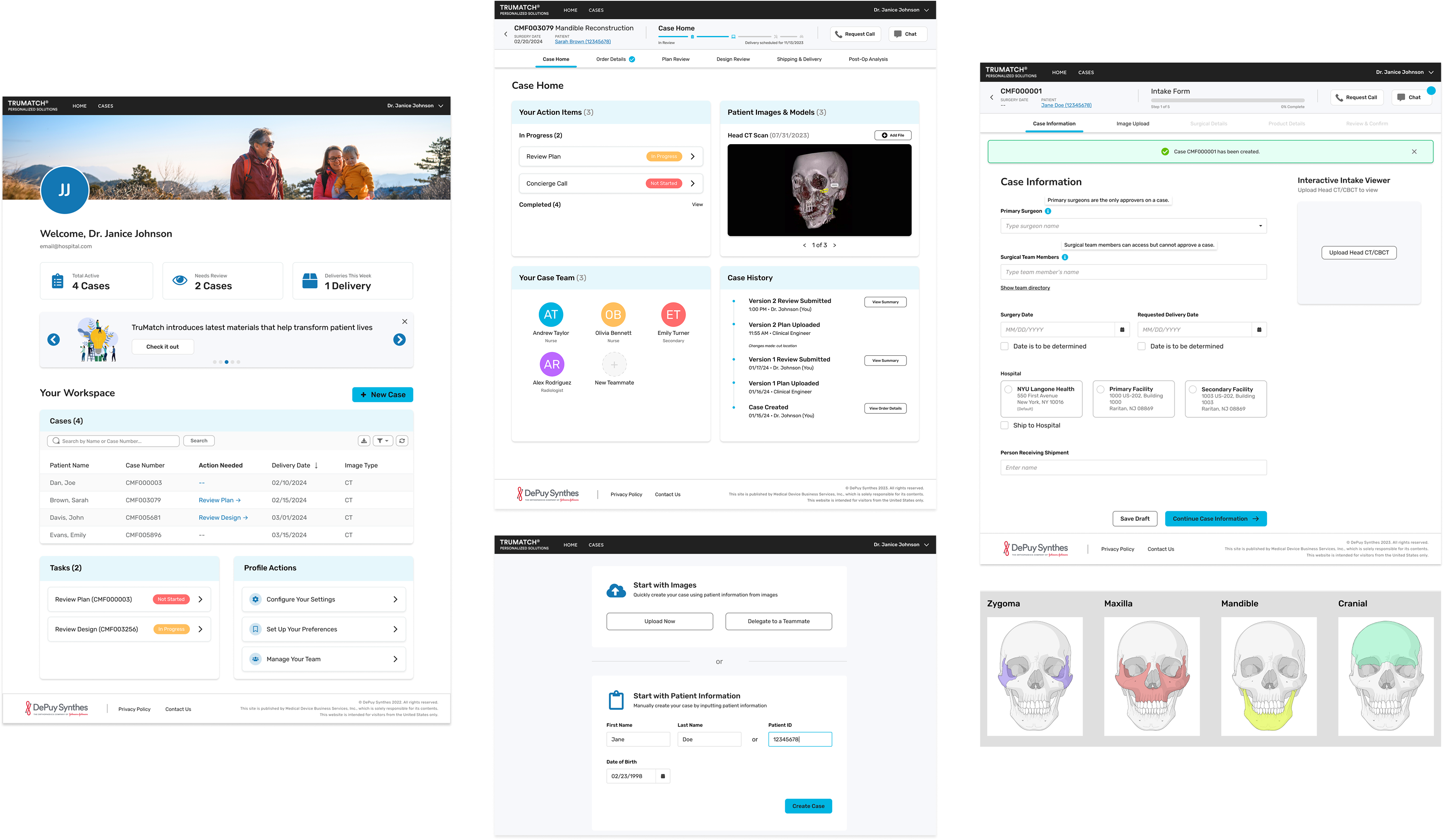
The complete hi-fidelity design across the surgeon dashboard, case management, intake form, and implant viewer: all designed within Appian platform constraints.

Hi-Fidelity Designs: Dashboard, Cases, Intake, Implant Viewer
Responsive Design

Web-to-Mobile Design

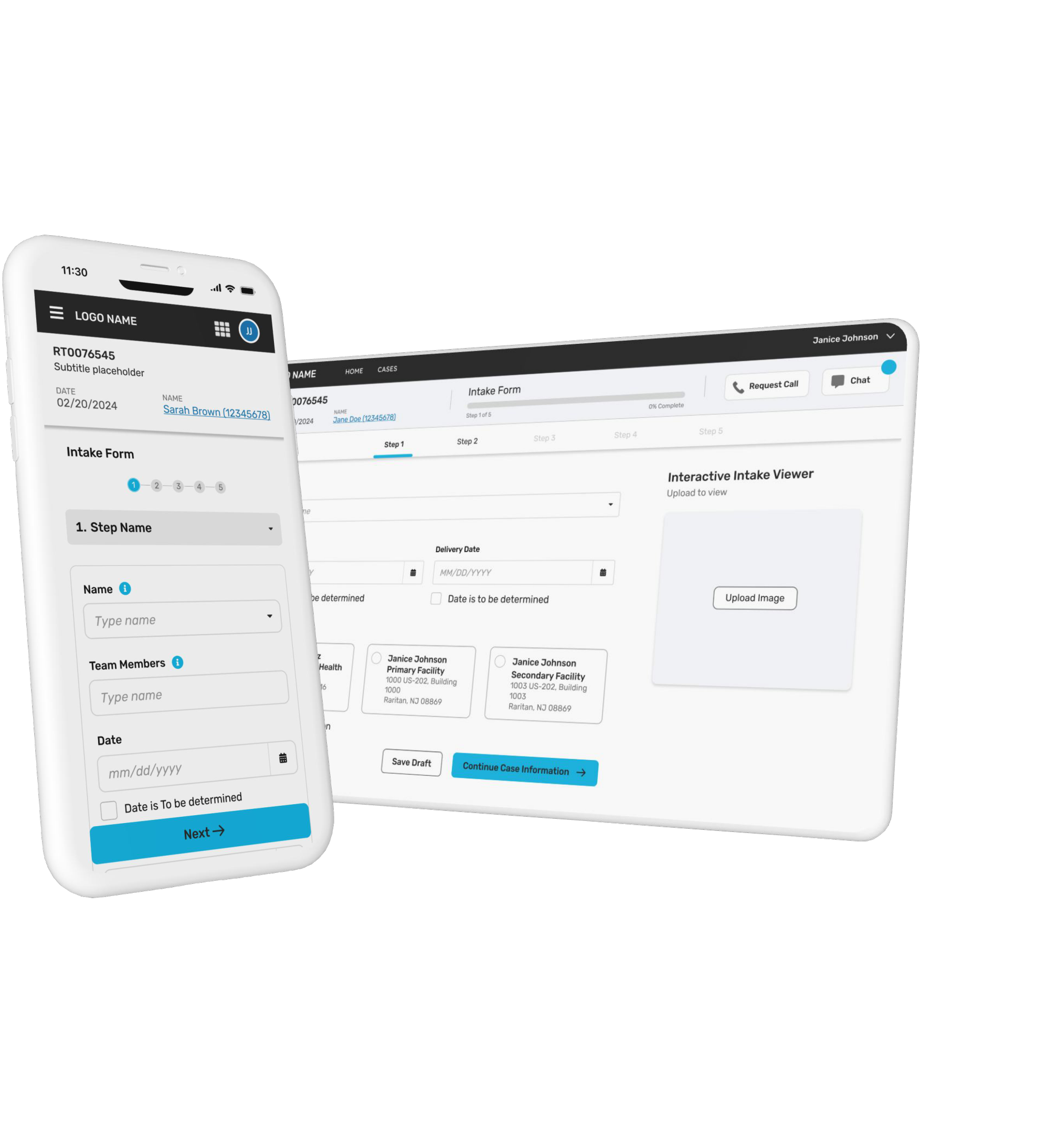
Mobile was not an afterthought; it was a core use case.

  • Check case status and review tasks easily
  • Improves efficiency
  • Ensures intuitiveness
  • Simplified, stacked layouts
Web and Mobile UI Screenshots
Design Iterations

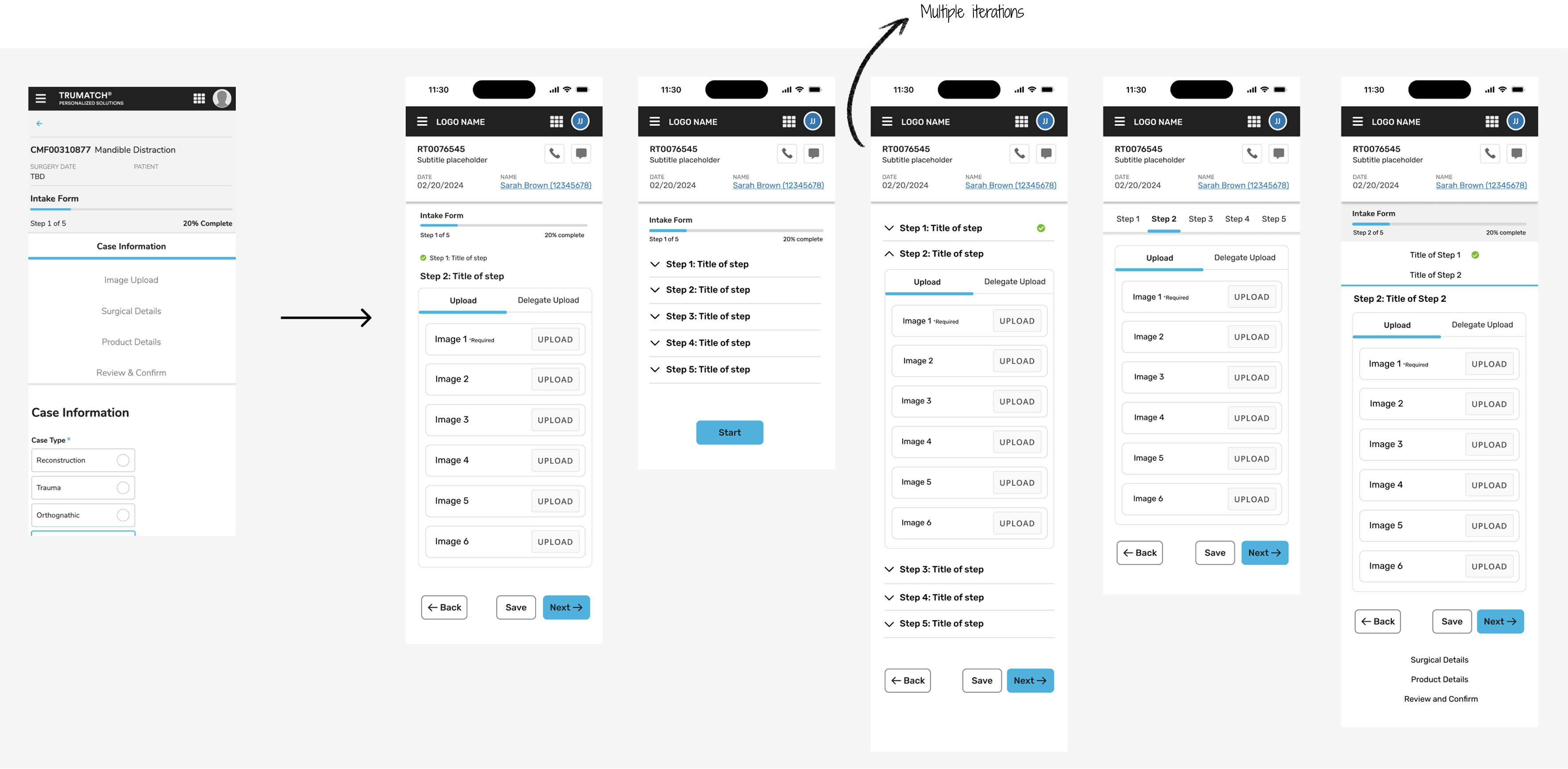
The biggest problem in the previous version:
Step Navigation

Multiple iterations were explored to give surgeons the ability to move freely between steps without breaking the form's data integrity.

Step Navigation: 5 Design Iterations
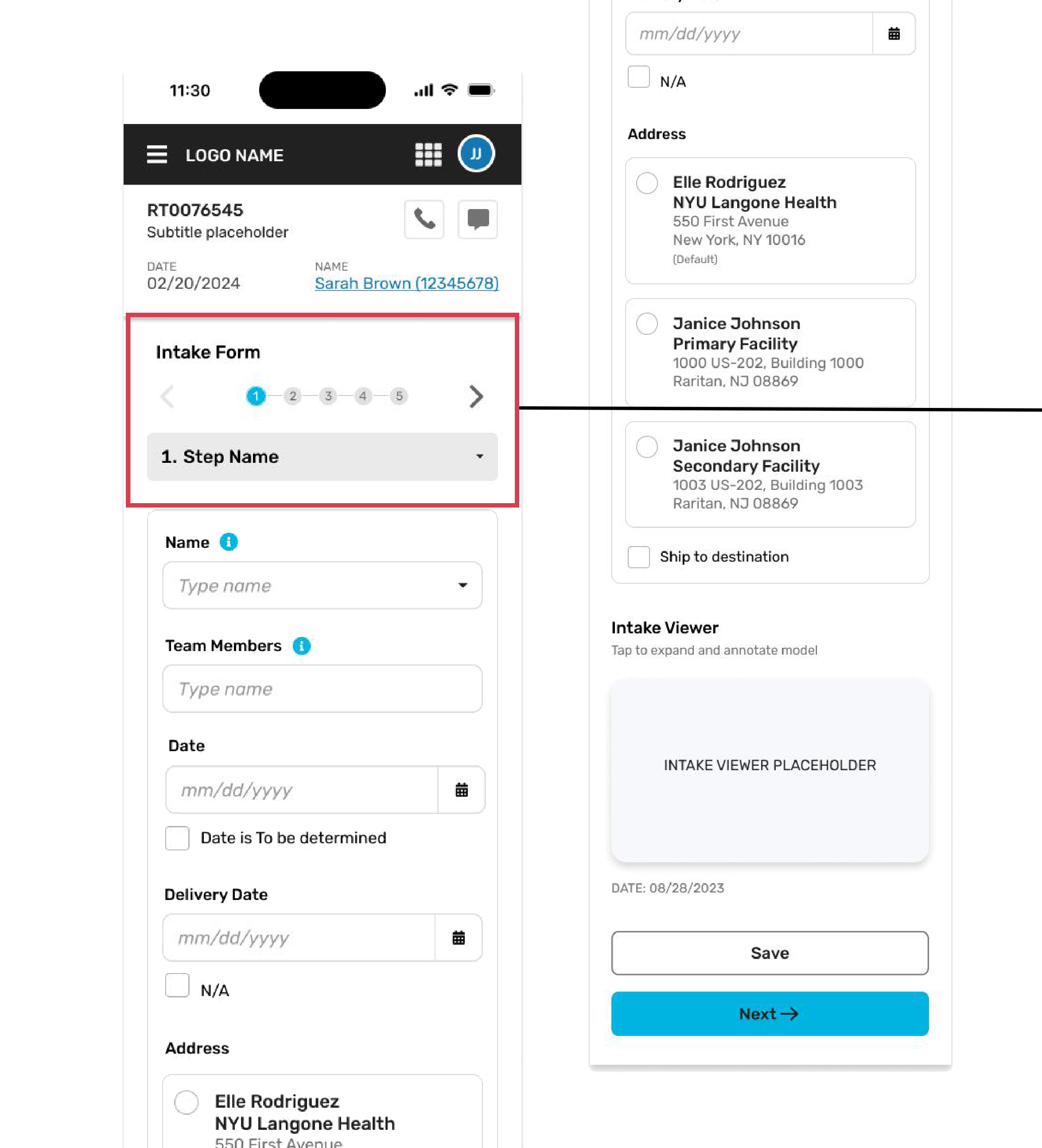
The Solution

How did I solve it?

  • Leverage Existing Appian Components
  • Accessible top arrows for easy left/right navigation
  • Step dropdown to jump directly to any step (e.g., Step 1–Step 5) with a single click
  • Design with developers in mind for an intuitive experience

Before

No way to jump to a specific step
Rigid linear navigation only
Broken on mobile devices

After

Step dropdown: jump to any step
Accessible top arrows for nav
Fully responsive across devices
Step Navigation Solution: Mobile UI
Delegate Persona

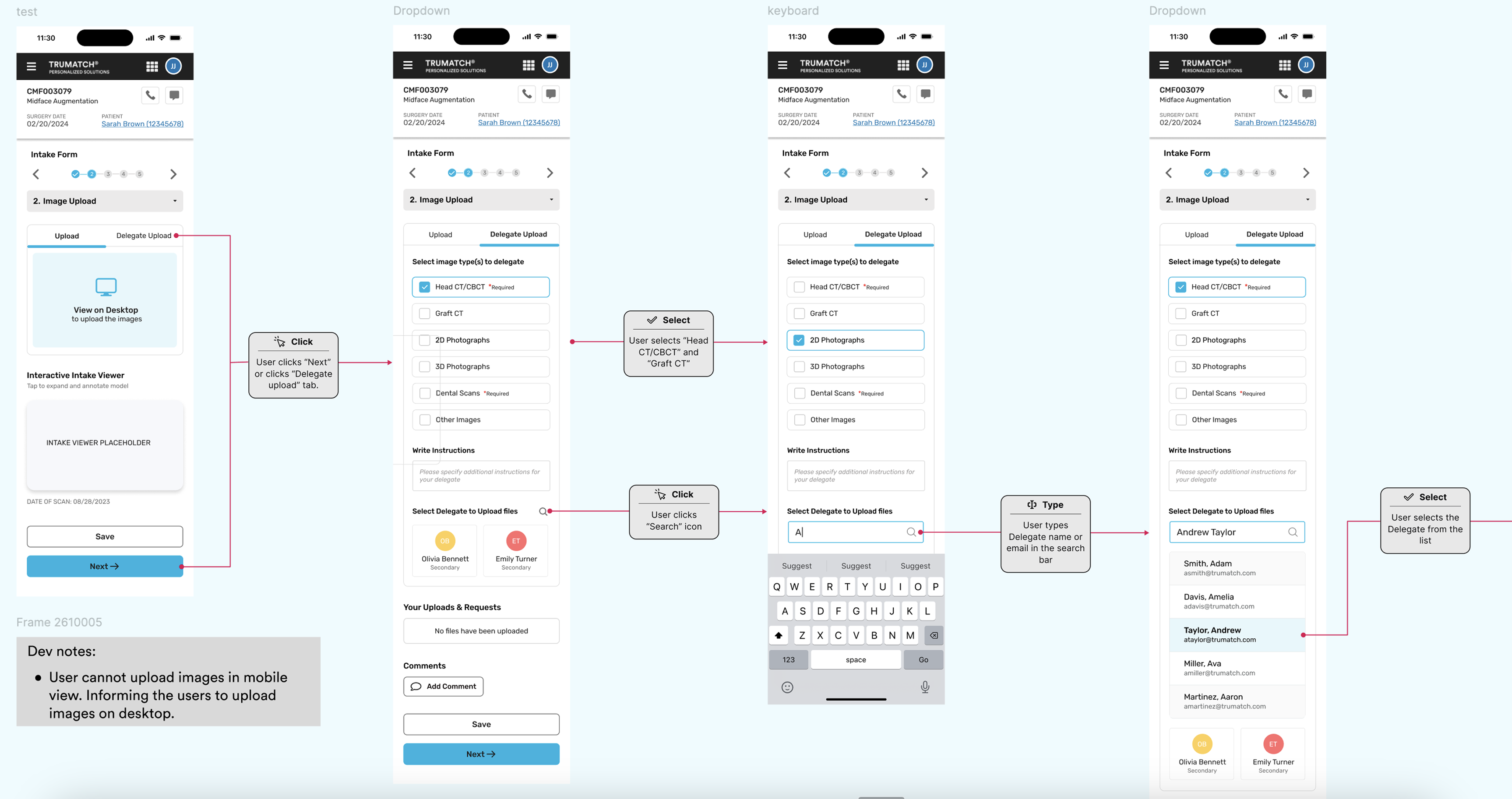
Delegate: Image Upload

Mobile experience is intentionally limited to image upload, with delegate-only access enabled for efficient task assignment.

  • Nurses or clinical assistants complete image upload on behalf of the surgeon
  • Surgeon retains final review and submission control
  • Delegate selector: assign by name or search the full delegate list
Dev note: User cannot upload images in mobile view: informing them to upload images on desktop.
Delegate Image Upload: Mobile Flow
Design-to-Dev Handoff

File Structure

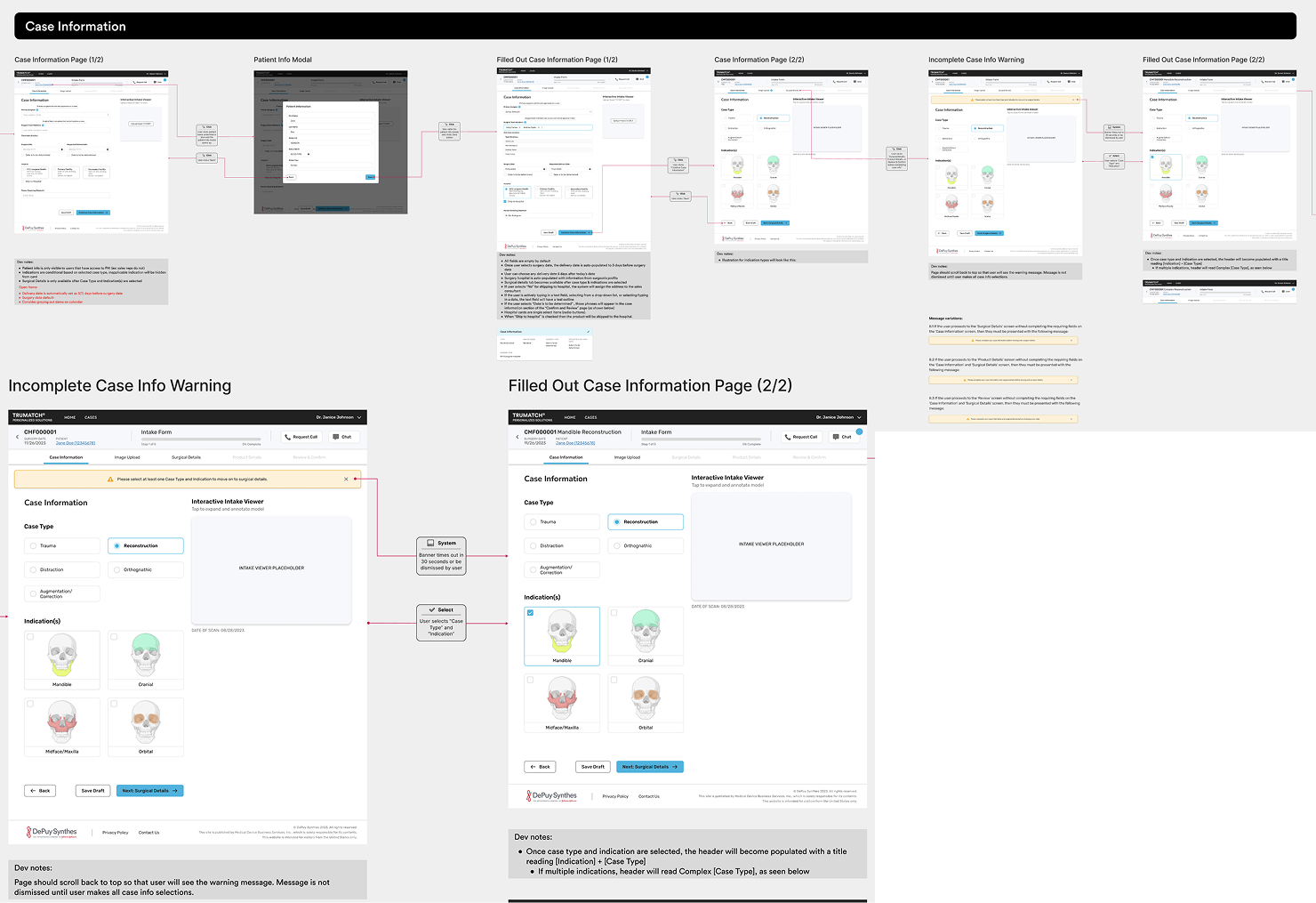
  • Structured files with clear, reusable interaction components across screens
  • Added detailed dev notes to clarify interaction flows and support smooth design-to-development handoff
File Structure: Figma Annotations
Results

The Impact

25%
Improved development efficiency ensuring design accuracy: clear interactions and dev notes in Figma
30%
Converted web designs to mobile, slashing mobile-specific issues by 30% and boosting design consistency
40%
Dynamic design system for multiple branches, enabling one-click style updates & cutting design time by 40%
Reflection

Challenges & Key Learnings

Challenges

  • Aligning multiple stakeholders across designers and product managers with differing priorities
  • Translating complex surgeon workflows and pain points into intuitive, scalable UX
  • Designing within strict clinical, regulatory, and data constraints

Key Learnings

  • Deep collaboration with surgeons is critical to uncover real workflow pain points
  • Strong UX in healthcare requires clarity, validation, and error prevention over visual complexity
  • A well-structured design system enables consistency across teams and speeds up delivery
  • Designing for regulated systems strengthened my ability to balance usability, safety, and scalability

Interested in working together?

Let's talk about design, healthcare tech, or your next product challenge.

Get in Touch All Projects LinkedIn