Academic Capstone · UX Design

FitGamer
Beat the
Addiction

Designing a mobile app that motivates gamers to improve their physical health by suggesting outdoor activities with a buddy, guided by their own gaming data.

Role
UX Designer
Duration
8 Weeks
Tools
Figma · Adobe XD
Mentor
Tarun Biswal
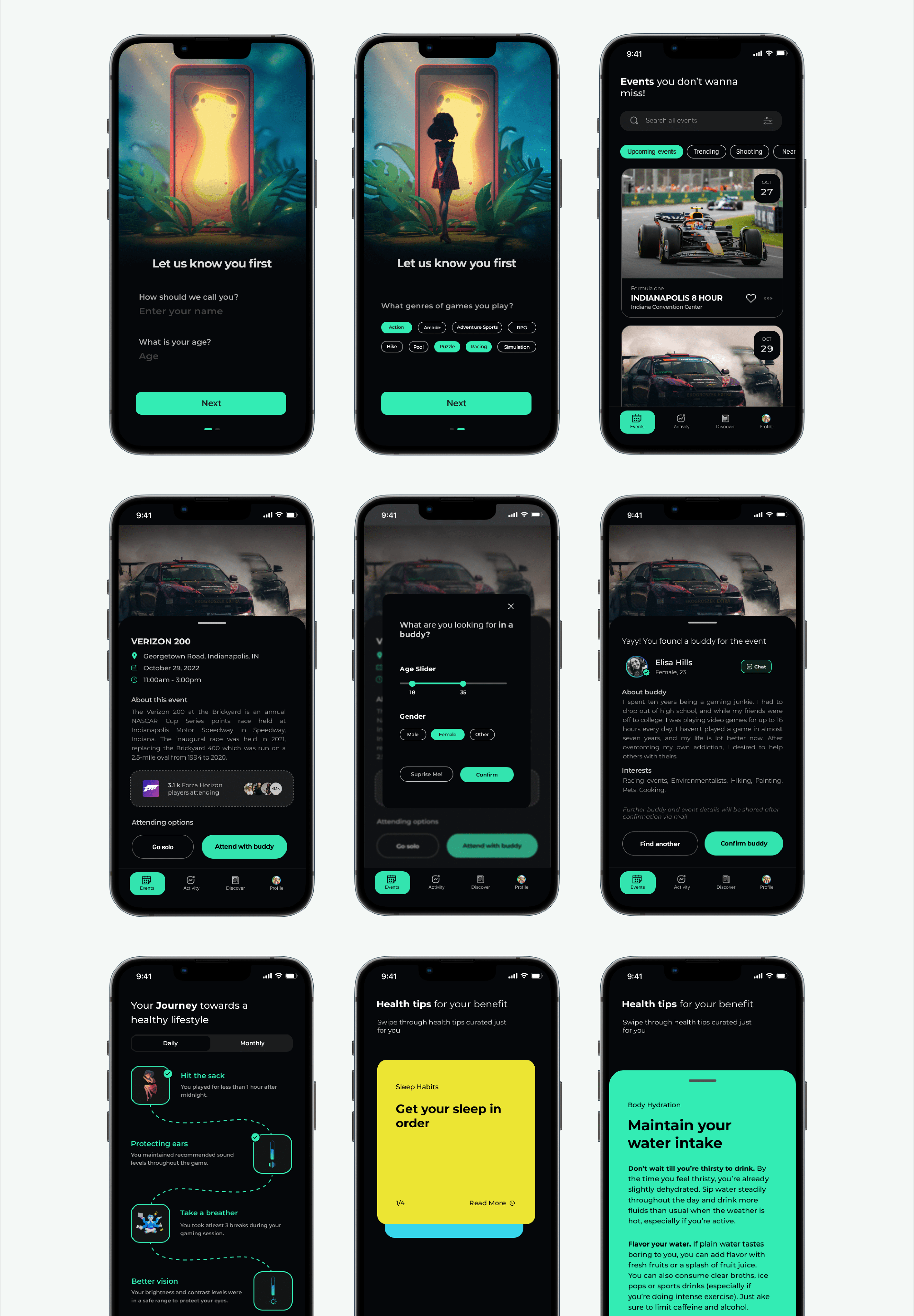
FitGamer App: Mobile Screens
My Role
UX Designer End-to-End Process
Timeline
8 Weeks Research → Hi-Fi Prototype
Tools
Figma · Adobe XD Miro · FigJam
Scope
Research · IA · Prototype Usability Testing
Problem Context

Young gamers are losing their
physical health to screens

The Core Problem
Young boys addicted to gaming are unable to take care of their physical health due to excessively long gaming hours, neglecting sleep, exercise, nutrition, and social interaction.
Excessive Screen Time
Gamers spend extended periods in front of screens, often losing track of time and skipping basic daily activities.
Zero Physical Activity
Sedentary gaming habits displace outdoor movement, leading to physical deconditioning and health issues over time.
Social Isolation
Online-only interactions replace real-world relationships, causing gamers to become disconnected from their physical communities.
"Gamers played for an extended period of time in an uncomfortable environment can lead to addiction." Research Finding
Project Overview

How can we help gamers improve their physical health?

Design Challenge
How can we help gamers in improving their physical health and overcoming video game addiction through a technology-based solution?
The Solution
FitGamer is an app that suggests personalized outdoor activities accompanied by a Buddy and provides real-time health tips based on your gaming activity patterns.

Final Prototype: Our solution consists of FitGamer to help gaming addiction recover from physical health problems. The app provides an option to select a person's activities in a recommended gaming activity while FitGamer suggests personalized routes and events based on gaming activity data.

My Responsibilities
User Research & Interviews
Competitive Analysis
Information Architecture
Wireframing & Prototyping
Hi-Fidelity UI Design
Usability Testing
Design Process

From Research to Prototype

A structured 8-week process that moved from understanding gamer behavior to delivering a tested hi-fidelity prototype.

Discover
User research, surveys, competitive analysis
Define
Personas, problem synthesis, HMW statements
Ideate
Feature prioritization, content strategy, IA
Design
Wireframes, style guide, hi-fi prototype
Test
Heuristic evaluation, think-aloud sessions
Research Phase

Understanding the Gamer

Research was conducted with students who had recent experience with gaming as part of daily academic or leisure activities, giving us authentic, relatable insights into gaming habits and health perceptions.

Data Collection
User Interviews & Surveys
Conducted user interviews and feature surveys to understand gaming frequency, physical activity levels, social habits, and openness to fitness interventions through technology.
User Interviews Feature Survey Observation
Competitive Analysis
Market & App Analysis
Analyzed existing fitness and gaming apps to identify gaps. Most solutions addressed fitness OR gaming in isolation, with no product bridging the two behaviors in a gamer-centric way.
Fitbit Nike Run Pokémon GO
Affinity Mapping
Problem Synthesis
Synthesized interview data through affinity mapping and qualitative analysis, clustering insights into themes: time blindness, lack of motivation, absence of social accountability, and poor self-awareness.
Affinity Map Themes Insights
Participants
Target Users
Focused on students with regular gaming habits as primary participants, as they represent the highest-risk demographic for developing addictive gaming behaviors and associated physical health decline.
Students Gamers 16–26 Academic Context
Key Findings

What Gamers Told Us

Interview data surfaced five core patterns that drove the design direction for FitGamer.

1
No Awareness of Gaming Duration
Most gamers had no sense of how long they'd been playing. They lost track of time and missed meals, sleep, and hydration cues.
2
Motivation Requires Social Connection
Gamers were more likely to go outside if a friend was involved. Solo fitness suggestions were often ignored. Accountability was key.
3
Gamification Works as Motivation
Users responded positively to progress tracking, rewards, and challenge mechanics. The same triggers that make games addictive could be used for good.
4
Activities Must Feel Relevant
Generic fitness prompts were dismissed. Suggestions tied to gaming themes, nearby events, or community activities felt more relatable and actionable.
5
Small Steps Over Big Commitments
Gamers preferred short outdoor activities (20–30 min walks, bike rides) over gym commitments. The barrier to entry needed to be low.
6
Secondary Challenges: Content Discovery
Users struggled to find relevant events and activities near them. Existing apps lacked a gamer-friendly filter or discovery mechanism.
Design Strategy

Three Pillars of the FitGamer Solution

FitGamer's solution was built on three interlocking principles drawn directly from research insights, making the app feel native to gaming culture while nudging users toward healthier habits.

Buddy System
Match gamers with a fitness buddy from their gaming network for outdoor activities. Social accountability dramatically increases follow-through.
Personalized Activity Feed
Suggest nearby outdoor activities and local events based on the user's gaming duration data. The more they played, the more targeted the suggestion.
Health Tips Engine
Deliver personalized micro-health tips (stretch, hydrate, take a break) timed to gaming sessions. Small interventions that compound over time.
Product Structure

Information Architecture

The IA was designed to keep the app experience focused, with three primary flows and minimal depth, ensuring gamers could move from impulse to action in under three taps.

1Onboarding: Gaming Profile & Health Goals Setup
2Home Dashboard: Today's Journey, Health Tips & Activity Rings
3Activity Feed: Nearby Events & Suggested Outdoor Activities
4Buddy System: Find, Match & Schedule With a Gaming Buddy
5Health Tracker: Gaming Duration, Steps & Wellness Metrics
The IA prioritized discovery over depth, placing the most motivating features (events, buddy matching) one tap from the home screen.
Visual Identity

Style Guide & Brand System

A dark, gamer-native design system built on high-contrast teal, IBM Plex Sans bold headers, and card-based layouts. A visual language native to gaming culture.

Color Palette
#00D68F: Primary Teal
CTAs, progress rings, interactive elements
#080F1A: Deep Navy
App background: gaming immersion
#0F2236: Surface
Cards, panels, elevated surfaces
#E8F4F8: Off-White
Headings and primary text
Typography
IBM Plex Sans 700
Headers · Labels · UI Titles
Inter Regular: Body text, descriptions, and UI copy optimised for readability.
Dark Mode Mobile-First High Contrast
Gaming Icons
Rounded, game-native
Card Layouts
Card-first, swipeable
Mobile-First
Bottom nav · thumb zones
Accessibility
WCAG-AA contrast
Hi-Fidelity Designs

FitGamer: Final App Screens

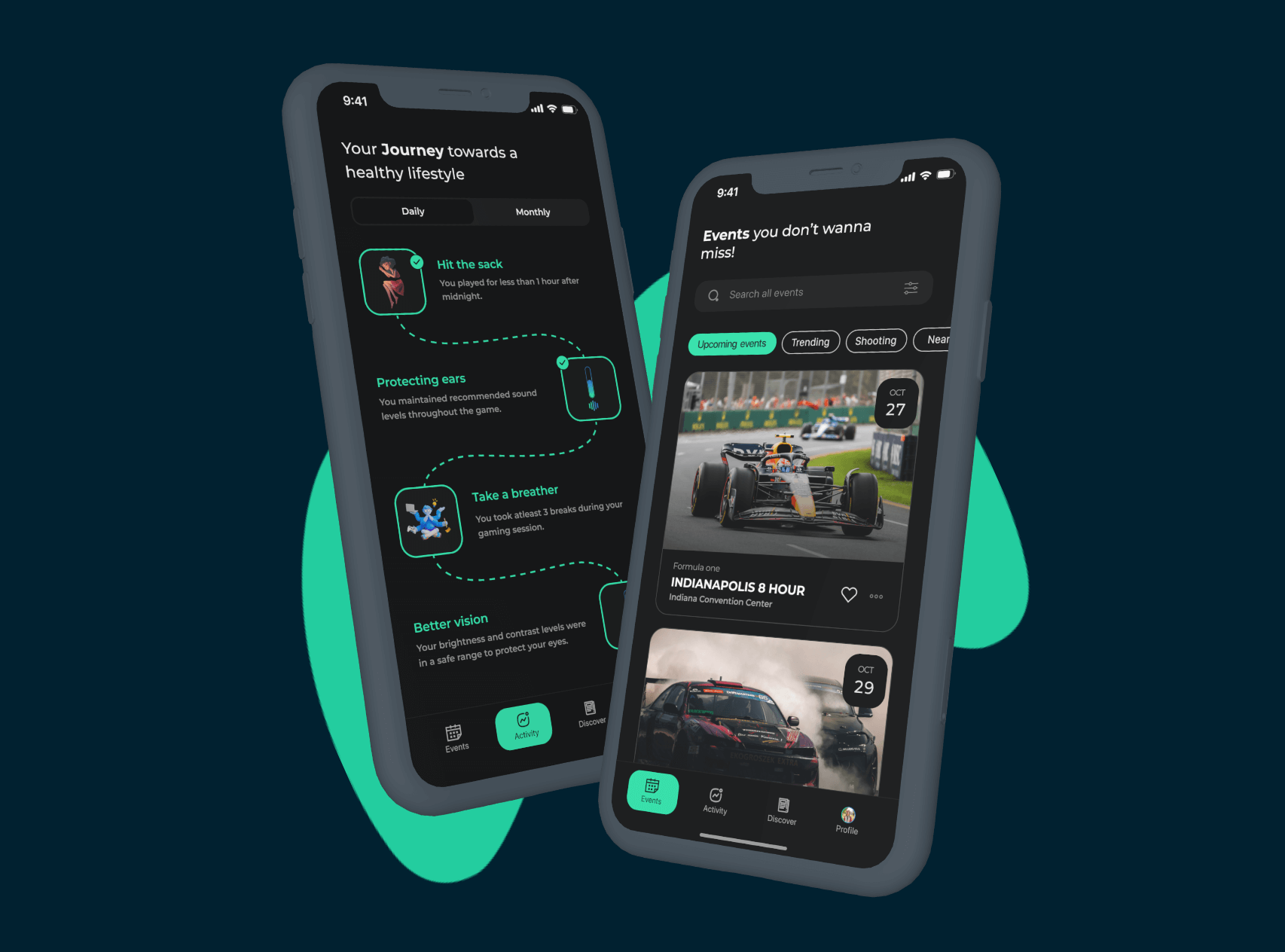
A dark-themed, gamer-native design featuring a teal accent palette, card-based layouts, and bold typography. Health feels like part of the gaming lifestyle, not a departure from it.

FitGamer Hi-Fi: All App Screens
Dark Gaming Theme
Deep navy background with teal accent, visually consistent with gaming aesthetics and easy on the eyes during long sessions.
Teal Accent System
A single vibrant accent color drives CTAs, progress indicators, and interactive elements, maintaining visual focus and hierarchy.
Mobile-First Design
Designed for one-handed use with bottom navigation, thumb-friendly tap targets, and swipeable activity cards.
Interactive Prototype

See FitGamer in Motion

The prototype demonstrates the key user flows, from the onboarding experience to activity discovery, buddy matching, and in-session health nudges.

Onboarding Flow
Profile setup & gaming habit capture
Activity & Events
Personalized outdoor activity feed
Buddy & Health Tips
Social accountability & wellness nudges
Usability Testing

Evaluating the Experience

Based on all usability tests, I performed Heuristic Evaluation and Think Aloud exercises to identify usability issues and areas of improvement across the prototype.

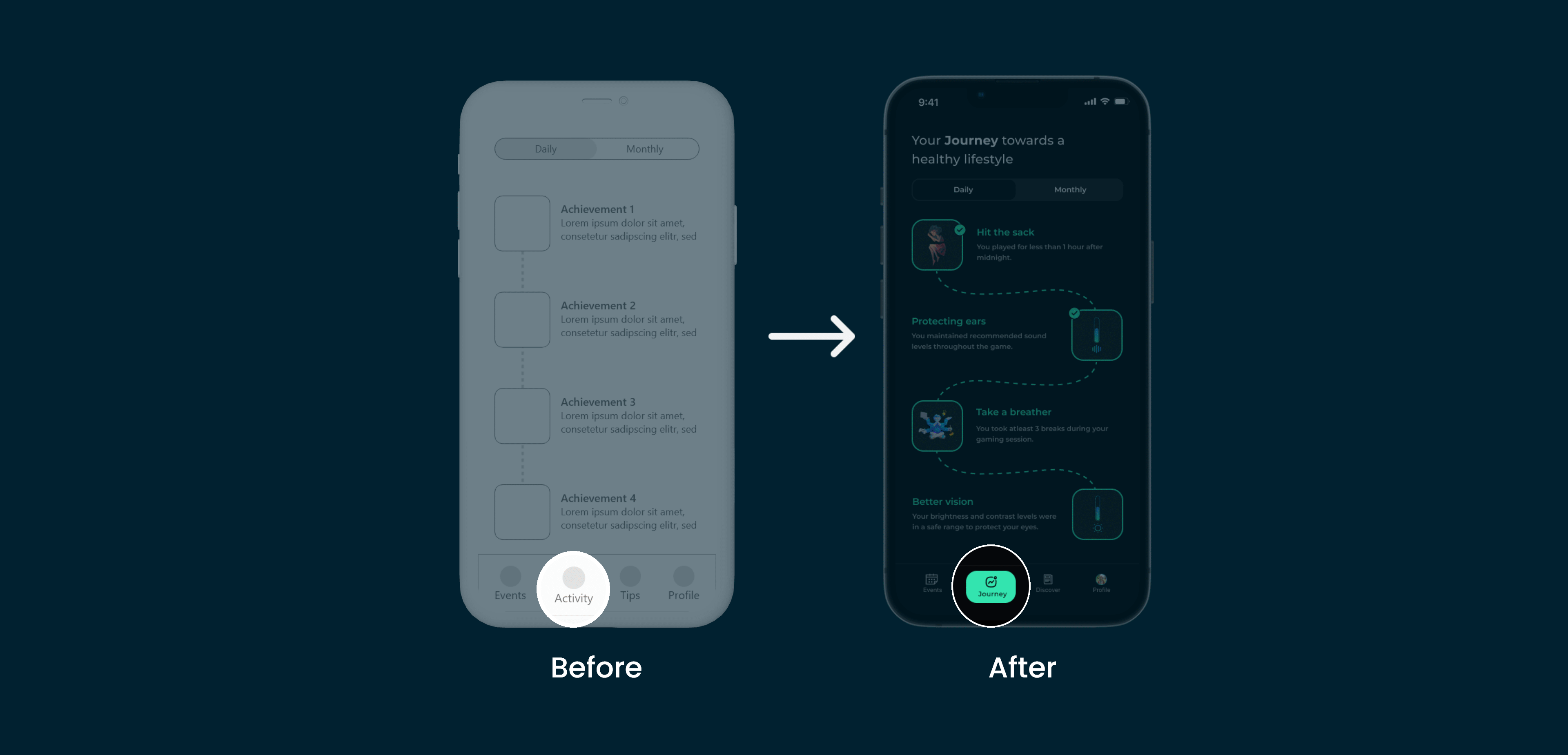
Issue 01: Tab & Content Mismatch
"Inconsistencies between the tab name and the content of the page created confusion during navigation."
Heuristic Violated
Consistency & Standards: Tab labels should accurately reflect the content they contain. Mismatched naming increases cognitive load and errors.
Design Fix
Renamed navigation tabs to directly mirror the content section headers, ensuring a one-to-one correspondence between label and destination.
Issue 01: Before and After screens
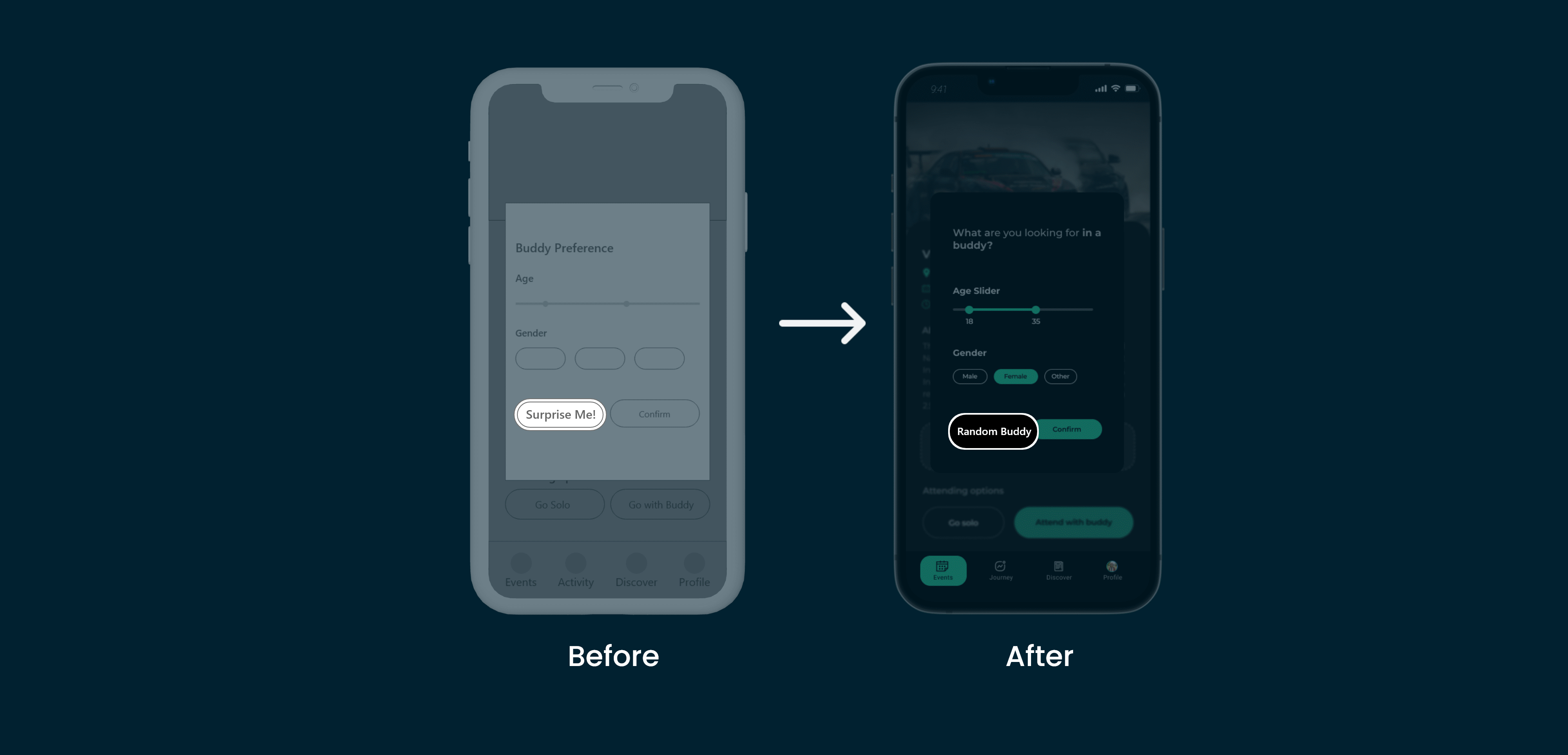
Issue 02: Random Buddy Button Clarity
"The 'Random Buddy' button functionality was not clear. Users did not understand what would happen after tapping it."
Heuristic Violated
Visibility of System Status & Recognition over Recall: Users should understand what a button does before pressing it, without needing to recall prior app context.
Design Fix
Added a short descriptor tooltip and renamed the button to "Find Activity Buddy" with a brief explanation modal on first use, reducing uncertainty and increasing tap confidence.
Issue 02: Before and After screens

Before & After Iterations

Before

Tab names didn't match page content
"Random Buddy" label caused confusion
No feedback on button actions
First-time users felt lost navigating

After

Tab labels aligned with section content
Button renamed to "Find Activity Buddy"
Micro-copy and tooltip added for clarity
Onboarding modal improved first-use orientation
Results

Project Impact

Measured through usability testing sessions and user feedback during prototype evaluation.

85%
Of test participants found the app concept highly relevant to their daily gaming and health habits
2x
Improvement in task completion rate after iterating on navigation labels and buddy button clarity
100%
Of participants said they would use the Buddy feature to motivate outdoor activity with friends
Reflection

My Key Learnings

Three foundational UX lessons that will shape every project I work on going forward.

Effective Communication is the Key to a Successful Project
Setting clear goals and aligning the team through regular check-ins and presentations ensured everyone moved in the same direction, preventing costly re-work and keeping the project on track.
Constant Iterations Lead to an Effective Solution
No design is perfect on the first attempt. The two usability issues uncovered through testing reinforced that iteration is not a sign of failure. It's the mechanism through which great design emerges.
Following a Right UX Approach is the Key
Structuring the process, from research through testing, ensured decisions were grounded in real user behavior rather than assumptions, producing a design that genuinely resonated with the target audience.

Interested in working together?

Let's talk about design, gaming UX, or your next product challenge.

Get in Touch All Projects LinkedIn