Claude AI Skill · UX Research

UX Interview Analyzer

A Claude AI Skill that reads raw UX interview transcripts and auto-generates anonymized .docx research reports and FigJam affinity boards covering pain points, emotion tags, themes, and sentiment in ~30 seconds. Tested across 25 real transcripts for accuracy.
Claude AI .docx Output FigJam Board Auto-Anonymized Video / Drive / Zoom Sentiment Analysis
Type
Claude AI Skill
Output
.docx + FigJam
Time to report
~30 seconds
Tested on
25 transcripts
Claude AI Skill analyzing a UX transcript
Insight categories
3
Pain points, good points, improvements
Anonymization
100%
Names replaced before any output is written
File formats
2
.docx report + FigJam board spec
Tested on
25
Real transcripts validated for accuracy
Capabilities

What the Skill Extracts

Drop in any UX interview transcript. The skill does the heavy lifting so you can focus on decisions, not documentation.

Pain Points

Each friction moment tagged with severity (High / Med / Low), direct participant quotes, emotion label, workaround used, frequency count, and feature area.

Good Points

What's already working, extracted with strength rating, supporting quotes, emotion tag, and a competitive edge note to preserve in future iterations.

Scope of Improvement

Opportunity areas with priority ranking, type (Enhancement / New Feature / Bug Fix), effort estimate, and impact vs. effort context.

Key Themes & Patterns

Organic clusters that emerge across the session, named and described, cross-referenced with supporting data points from the transcript.

Overall Sentiment

Session-level sentiment (Positive / Mixed / Negative) with a one-line rationale derived from the dominant emotional tone across the interview.

Auto-Anonymization

All participant names are detected and replaced with coded identifiers (P1, P2 …) throughout the entire report before any output is written.

Outputs

What Gets Generated

Two ready-to-share artifacts drop to your Desktop automatically. No copy-pasting, no reformatting.

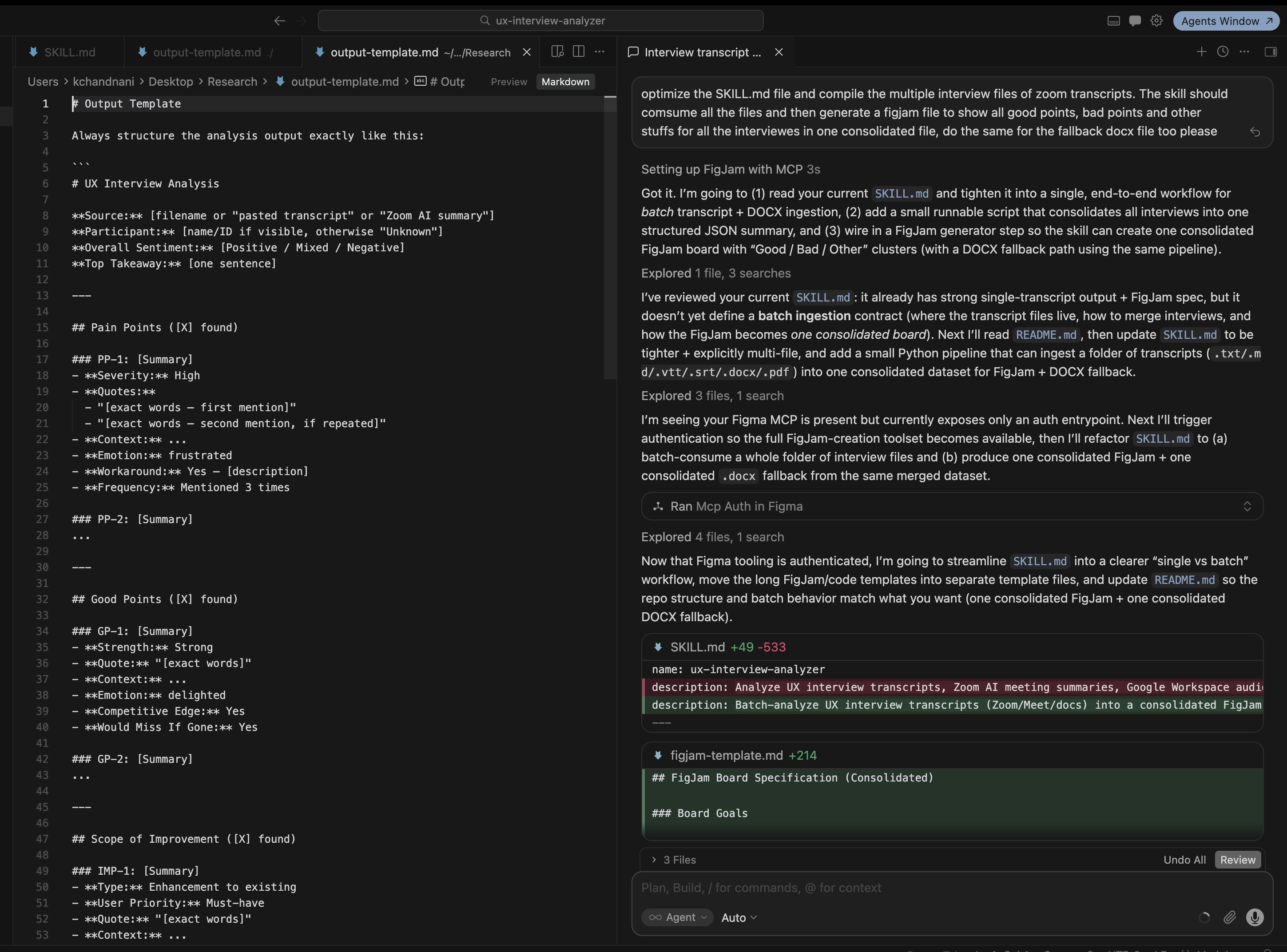
Claude AI Skill in action
The Skill in Action
Claude AI processes the transcript in real time

Paste any UX interview transcript into Cursor chat. The skill reads the SKILL.md contract, parses the output template, and runs a structured analysis pipeline that extracts all findings, anonymizes names, and writes both output files without any manual steps.

SKILL.md output-template.md Interview transcript Figma MCP
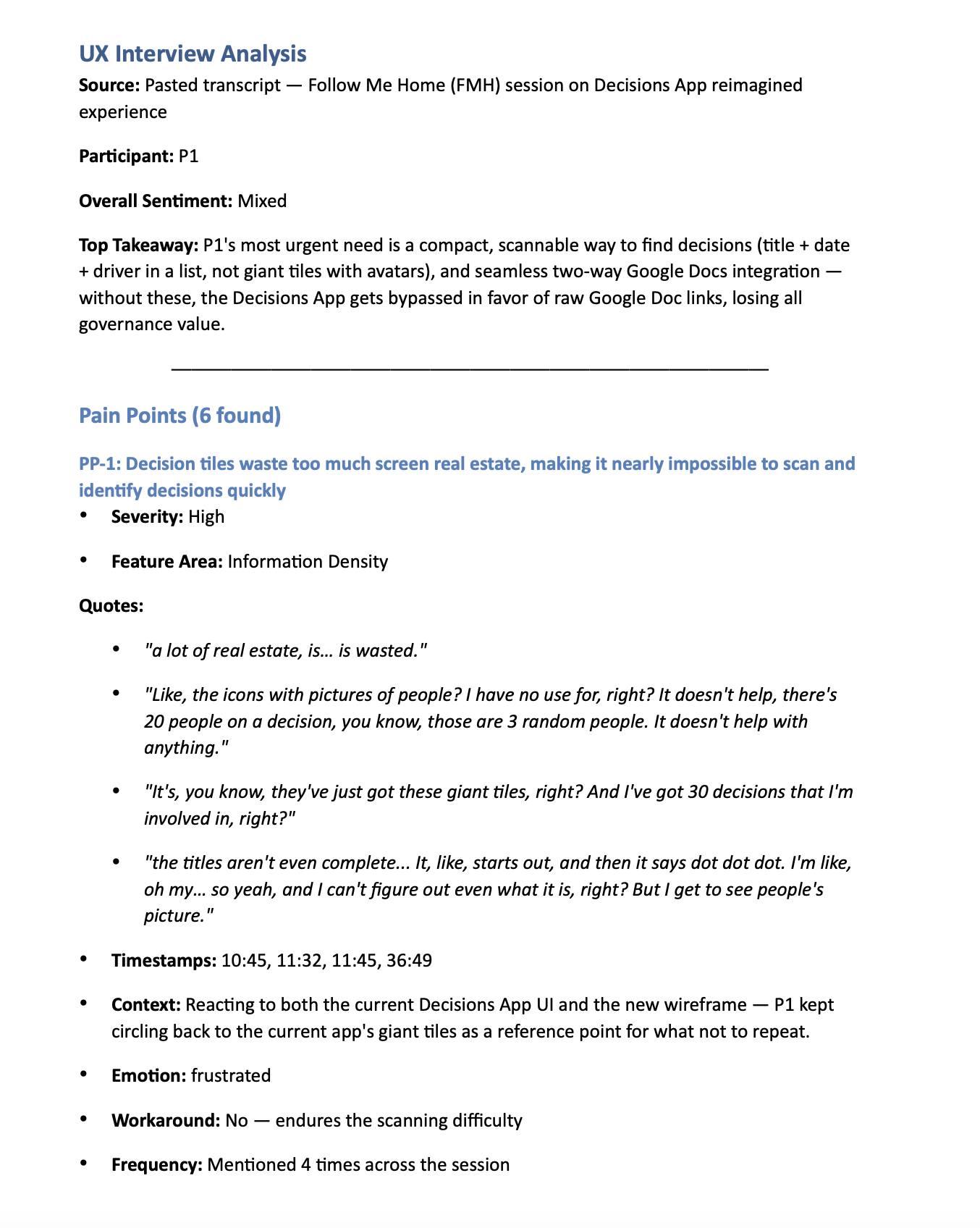
Generated .docx research report
Output 01 · Structured Report
Formatted .docx Research Document

A Word-compatible report with participant metadata, overall sentiment, top takeaway, and every pain point with severity, timestamped quotes, emotion tag, workaround, and frequency. Stakeholder-ready, no editing needed.

.docx Severity ratings Verbatim quotes Emotion tags
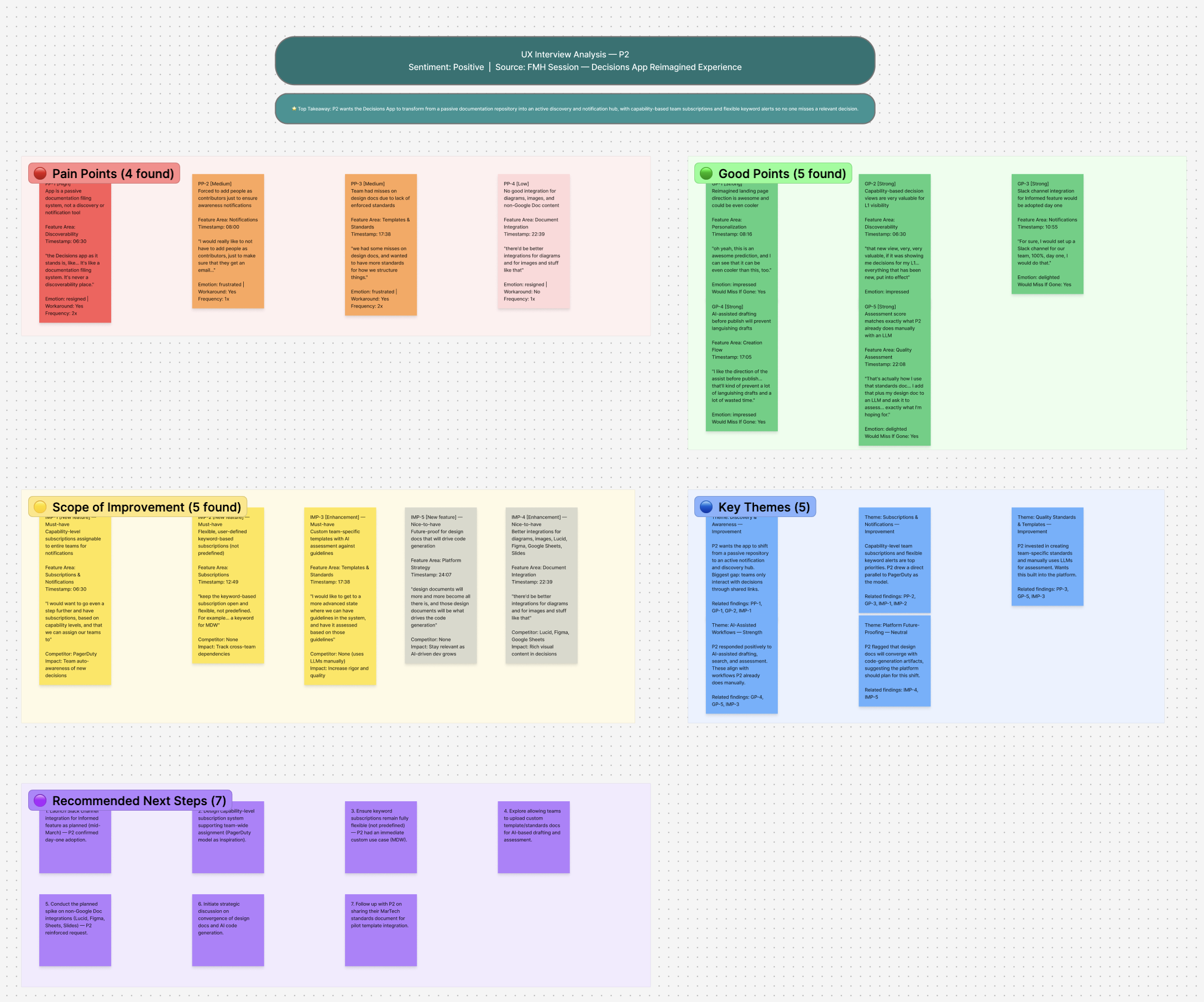
Auto-generated FigJam affinity board
Output 02 · Visual Board
FigJam-Ready Affinity Board

Color-coded sticky note clusters for Pain Points (red), Good Points (green), Scope of Improvement (yellow), Key Themes (blue), and Recommended Next Steps (purple). Ready to share in design reviews.

FigJam template Color-coded clusters 5 board zones
Under the Hood

How It Works

A structured pipeline from raw transcript to two polished deliverables, triggered by a single paste.

01
Transcript or recording is dropped into Cursor chat

Works with pasted text, Zoom AI summaries, Google Workspace docs, or raw notes. Any MP4 or video file can also be sent directly. If connected to Google Drive or Zoom, recordings can be inserted straight from the source without downloading first.

02
SKILL.md contract defines the extraction rules

The skill reads its own SKILL.md file which specifies exactly what to extract, how to structure each finding, and what fields are required for Pain Points, Good Points, Scope, Themes, and Sentiment.

03
Names are detected and replaced

Before any output is written, the skill scans for participant names and replaces every occurrence with P1, P2, P3 ... throughout all sections, ensuring full anonymization across quotes, context notes, and metadata.

04
Dual output written to Desktop

The skill writes a formatted .docx report and a FigJam board specification file to the Desktop simultaneously. No copy-paste, no reformatting. Open and share.

output-template.md
ux-interview-analyzer
# Output Template

## UX Interview Analysis
Source:    {{filename or "pasted transcript"}}
Participants:  {{name/ID, anonymize "Name" to "P1, P2 …"}}
Overall Sentiment: {{Positive / Mixed / Negative}}
Top Takeaway:  {{one sentence}}

## Pain Points ({{n}} found)

### PP-1: {{Summary}}
  ==Severity==   High | Med | Low
  ==Quotes==    "least words, first mention"
               "least words, second mention, if repeated"
  ==Context==    {{description}}
  ==Emotion==    frustrated | confused | anxious | …
  ==Workaround== No / {{description}}
  ==Frequency==  Mentioned {{n}} times across the session

## Good Points  /  Scope of Improvement  →  same schema

## Key Themes ({{n}})
### Theme Name
  ==Description====Data Points==## FigJam Board Spec
→  Pain Points (red)  ·  Good Points (green)
→  Scope (yellow)     ·  Key Themes (blue)
→  Next Steps (purple)
Setup

How to Install

Three steps. Takes under a minute.

1
Copy the skill folder. Move ux-interview-analyzer/ into ~/.cursor/skills/ on your machine. Create the skills/ directory if it doesn't exist yet.
2
Restart Cursor, or open a fresh chat window so the skill is picked up by the agent runtime.
3
Paste any transcript into the Cursor chat. The skill triggers automatically. Your .docx report and FigJam board will appear on your Desktop in ~30 seconds.

Want to see more AI design work?

I'm exploring how AI can eliminate the tedious parts of UX research so designers can spend more time on insight and less on formatting.

Get the Skill File Back to AI Work